

Ajax live search, for a better site search
If your website has many pages, a good job search function is more important. Is your website based on WordPress? Then you don’t have to worry about the search feature, because it is a standard function. But what about a great search experience? Relevant search results are part of the game, but what happens to the search interface? Ajax Live search will help your visitors find your information faster without reloading the current page. Does it look like magic? It’s not! In this blog post I will tell you all about Ajax’s search.
What is Ajax and how does Ajax’s search work?
Ajax is no longer so new and means JavaScript and asynchronous xml. Through this technology, your script will publish a request to the server and in return the Script will get a response without reloading the page. As the name implies, the data sent must be formed as a XML structure.
Ajax search is merely a regular search consultation post for a web form, but the whole process is done in the background through JavaScript. The JavaScript code will use the search value from a Form field for AJAX application and the server will use the data received for a database consultation. The answer is returned to the same JavaScript file and finally passes to the HTML page.
Each time a user enters more characters in the search field, a new request is sent to the server. A typical AJAX search will work with the “input” event that fires after changing the value of a form item.
Search AJAX vs. Search for regular
From the information above, it seems that the AJAX search is a large regular search replacement. Sure, there are many advantages:
- Validation of basic form field without the server request
- The front and backend code are separated
- The search is faster and easier to use
- Combines the item values of form without reloading the page
- Using AJAX search on static websites
But there are also disadvantages, such as:
- Accessibility issues because the answer is dynamically loading to the HTML structure
- Validation of server side data is still necessary
- The Browser Back button does not return you to the results of the previous search (compared to a results page with a query chain within the URL)
- A higher loading of the server because a new request is submitted with all characters written in the search form
- You cannot create pages (cache) for search results.
Which of the two search interfaces is better, depends on your website and how visitors use your search feature. Check your search Ajax Live on different devices such as iPads and mobile phones. The search may not work for users on small screens.
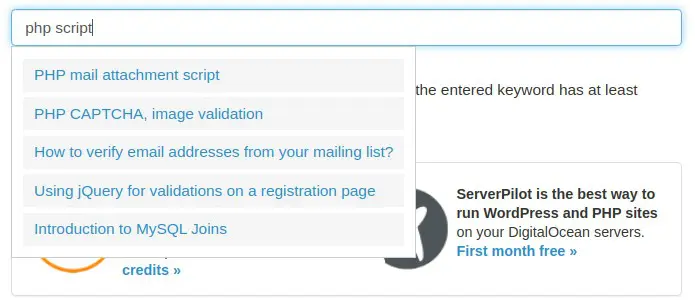
Example of Ajax live search code
For example, I used the JQuery Library that has different methods for managing AJAX applications. Next to the server I use a small PHP script to consult the MySQL database. For the HTML page, I use a boot template for Marc BootsTrap CSS.
The important part within the index.html file starts in row 37. In the form of the form I have an element with the “Ajax-Search” class. I use the class name for style. The “keyword” ID of the input item is used later to address the search value. The non -sorted list item is used for Ajax Live search results.
Enter the different parameters of the database to create a database connection. If the publication variable called “keyword” is not empty and the value is longer or equal to 3, the value will be disinfected and will be added to the MySQL consultation. If the result of the database query has rows, the loop is used to pass the values in an array. At the end, we leave the data from the matrix in a JSON format chain.
In row 2-4 we store the value of the “keyword” element within the “searchkeyWord” variable and we use it that a simple validation. Only if the length of the string is larger or equal to 3, the variable is used to publish the data in the server (Search.php file). If the return function sends the answer, the content container obtains a second CSS class and the JSON format chain is analyzed as list elements within the loop from row 7.
If the “searchkeyword” variable is less than 3 characters, the content container will be emptied and the “active” class is removed from the item.
The example code is very basic, but it gives a good idea how easy it is to create a live Ajax search on your website. If you want to see the code in action, try the Demonstration of live search. You can download the examples code, including the CSS style of my Gist to gitub.
Ajax Live WordPress website search
WordPress has a good native search mechanism and there are also many plugins that improve search results and search interface. It is not so much to work to change the WordPress code (PHP), but there are much better solutions.
Searchp Live Ajax Search
I use this complement for various customer websites and the main reason is that it works. For most WordPress topics, the “Out of the Box” complement. Simply activate the complement and start using it. The supplement is written for the SearchwP supplement, but it also works perfectly if you use something else.
Do you need more control over the search results on your WordPress website? Also use the Sarchwp Complement. The free version works well for websites and “normal” blogs and, if you need more, just update the premium version.
Ajax Live Search Functions on WordPress topics
The AJAX search feature is also included in many WordPress issues. If you use any of these topics, an additional complement is not required. We discovered Ajax search on topics like Oceanwp (through the nucleus extension package), dishes and fit.
Ajax Live Webshops Search with Woocommerce
Ajax search and filters are very important for web networks. For many customer projects, I use the premium complement ‘Facetwp’, which offers not only a live search function, but also filters for taxonomies and other product attributes. You will find much more plugins if you are looking for the WordPress complement deposit,
Are there other search options?
If you do not have a WordPress website or search on your personalized website does not work very well, you can try the following options:
Google Personalized Search engine
This is perhaps the easiest way to create a site search for your website. Just create your own search engine and let google do the work. Except for search Widget, no code must be changed to your website. The search widget does not have a live search feature, but the whole search engine is based on AJAX.
Doofinder
If your website is created with a database, Doofinder can be an option, even if your website is not based on WordPress. By providing a data feed, Doofinder will create a search index of your website. The result? A search feature powered by AJAX as you know about larger web stores. The free version is only good for smaller places, but in my opinion, doofinder’s largest (payment) plans are also affordable.
Searchiq
This site search is similar to DoofinderBut it also has a complete complement of WordPress. They offer interesting functions such as cross -domain search and can track your entire website if you cannot provide a data feed. While function is based on AJAX and search Widget also offers Ajax Live search. The free version is good for a website with 2000 pages.
You are not sure which solution is the best for your website? Try -all of them and decide then. All the options we mentioned are available for free or offer a free test.
Posted in: Jquery Code · WordPress Development
Technology
Berita Olahraga
Lowongan Kerja
Berita Terkini
Berita Terbaru
Berita Teknologi
Seputar Teknologi
Berita Politik
Resep Masakan
Pendidikan
Related Post

MDB5 View 3.0.0
[ad_1] Break changes focused on updating our design and documentation system + integration of MDB…