Viewing Visitors from the Website on Map – Xlinesoft Blog
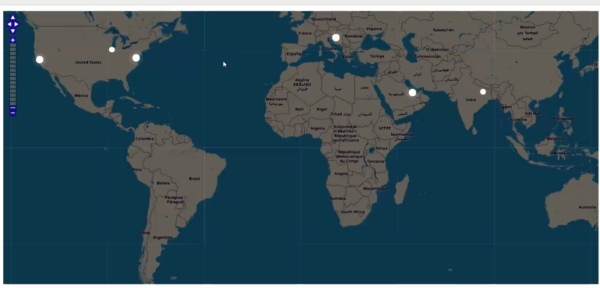
Our goal is to show visitors to the website on the map, similar to the following screen capture.
We will turn your IP address into LAT/GNL coordinates and show these markers on the opensreetmap map. To convert the IP addresses to LAT/GNL couples, we will use the geolocation data of IP2LOCATION.com.
We will show active users in the last ten minutes. If the user had any activity in the last 60 seconds, his point will be pushed.
There is also a YouTube video that provides more details of this project.
1. Database structure.
We will need two tables, “users” and “IP2Location”. The SCRIPT of the MySQL database is displayed below.
Please note that this SQL script only creates “IP2LODATION” but does not include data. The data set itself is about 300 MB and you can download it for free to
2. Enter a code fragment on a page where you want to show the map. In our case it would be the menu page. The code itself is very simple, only the DIV with “MAP” occurs.
PHP code:
3. ASFTERAPLICATIONINITIALized event
PHP code:
4. Custom_Function.js
The following JavaScript code goes to the Event Editor -> Custom_Function.js section.
$(document).ready(function() {
$("#map").width($(".r-fluid").width());
var height = $(window).height() - $("#map").offset().top - 30;
$("#map").height(height);
window.mapObj = new OpenLayers.Map("map", {
controls: [
new OpenLayers.Control.PanZoomBar(),
new OpenLayers.Control.Navigation()
],
});
var layer = new OpenLayers.Layer.OSM();
mapObj.addLayer(layer);
window.markersList = new OpenLayers.Layer.Markers("Markers");
mapObj.addLayer(markersList);
mapObj.zoomToMaxExtent();
updateMarkers();
setInterval(updateMarkers, 5000);
function updateMarkers() {
$.post("", {
getActiveUsers: true
}, function(response) {
var coordsArr = JSON.parse(response),
activeIds = coordsArr.map(function(coords) {
return coords.id;
}),
allIds = markersList.markers.map(function(marker) {
return marker.id;
});
$.each(coordsArr, function(i, latLon) {
if (!allIds.includes(latLon.id)) {
addMarker(latLon.id, latLon.lat, latLon.lng, latLon.active);
} else {
var curMarker = markersList.markers.find(function(marker) {
return marker.id == latLon.id
});
if (curMarker.active != latLon.active) {
$(curMarker.icon.imageDiv).toggleClass("active", latLon.active);
}
}
});
allIds = markersList.markers.map(function(marker) {
return marker.id;
});
for (var i = 0; i
5. CSS code ( Style Editor -> Modify CSS )
We use this CSS code to customize and prettify the default look of OSM map.
Technology
Berita Olahraga
Lowongan Kerja
Berita Terkini
Berita Terbaru
Berita Teknologi
Seputar Teknologi
Berita Politik
Resep Masakan
Pendidikan
Related Post

A faster website with Caché and Caché of Objects
[ad_1] Do you have a dynamic website built with MySQL and PHP? If your website…